Bust-Down+
NVIDIA GeForce RTX-2060 Super 8G
NVIDIA GeForce RTX-2060 Super 8G
Couldn't load pickup availability
USED NVIDIA GEFORCE RTX 2060 SUPER 8G
✅ Like-New Condition | High-Performance 1440p Gaming Graphics Card ✅
Upgrade your desktop with this Pre-owned, Like-New NVIDIA GeForce RTX 2060 SUPER. This card delivers exceptional performance for 1440p gaming and professional workloads, supported by NVIDIA's renowned architecture. It's factory Overclocked and features RGB lighting to complete your gaming rig's aesthetic.
Core Performance Features:
- Memory: True 8GB GDDR6 capacity with a 256-bit interface for high-speed texture loading and multitasking.
- Cooling: Efficient Double Fan thermal design ensures stable temperatures even during intensive gaming sessions.
- Connectivity: Utilizes the high-speed PCI Express 3.0 x16 interface.
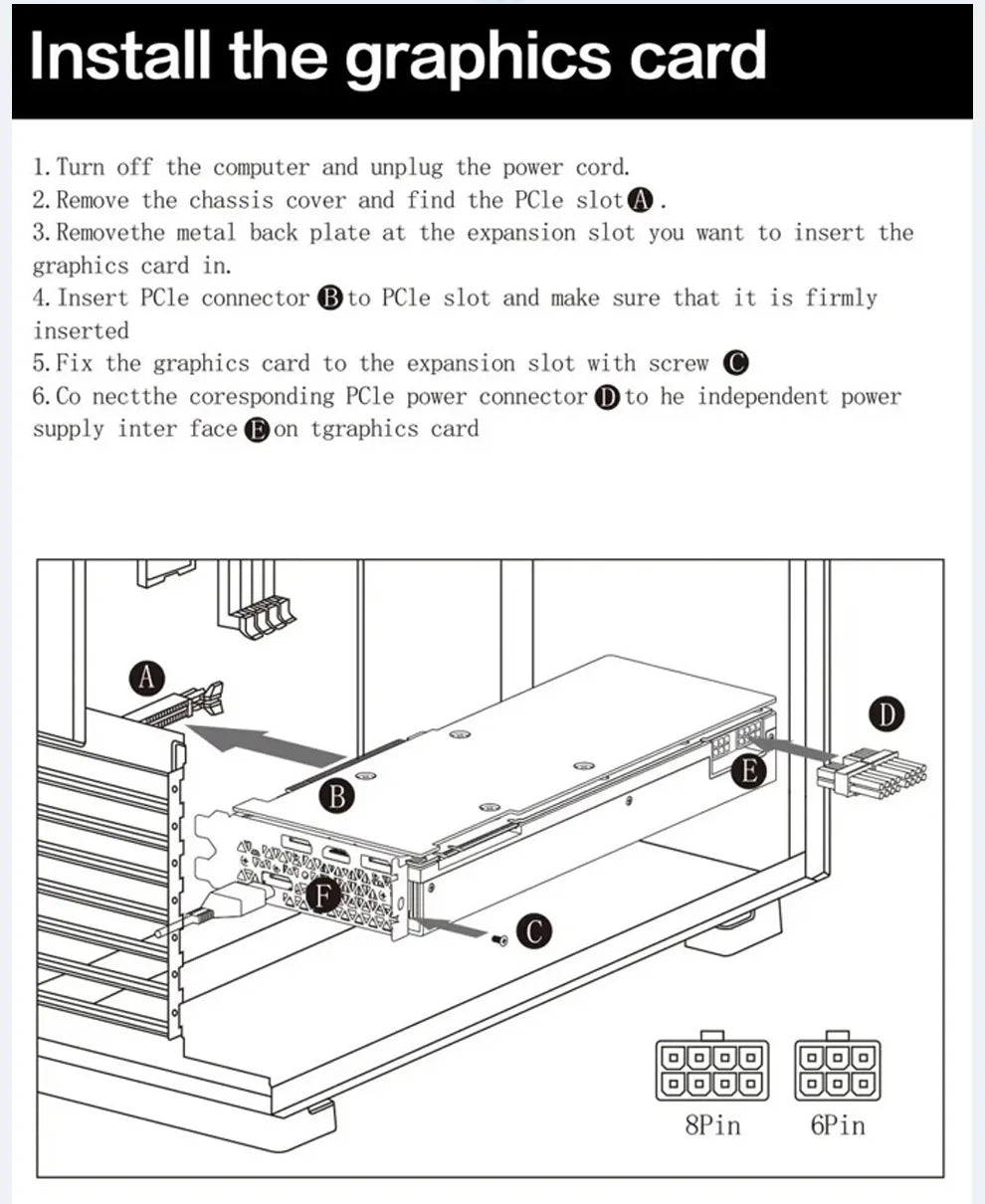
- Power Ready: Requires a standard 8-pin Power Connector for reliable operation.
Complete Technical Specifications:
| Parameter | Detail |
|---|---|
| GPU Model | NVIDIA GeForce RTX 2060 SUPER |
| Video Memory | 8 GB GDDR6 |
| Bus Standard | PCI E 3.0 x16 |
| Memory Interface | 256 BIT |
| Power Connector | 1 x 8-pin |
| Cooling | Double Fan |
| Output Ports | HDMI, DisplayPort (DP) |
| Condition | Pre-owned / Like New |
| Aesthetic Features | Overclocked (OC), RGB Lighting |
🔧 Quick Guide: Installing Your GPU Support Bracket
The NVIDIA RTX 2060 SUPER is heavy enough to benefit from a GPU support bracket to prevent sagging over time. If you purchased one, follow these quick steps to ensure maximum stability and longevity for your card.
Preparation: Safety First
- Power Down: Completely shut down and unplug your PC from the wall socket.
- Access: Open your PC case and locate the PCIe slot where the graphics card is installed.
Installation Steps:
*(Steps apply to most standard horizontal brackets that mount to the case)*
- Placement: Identify the best point to support the card, usually near the outer edge or corner of the card's heavy shroud/cooler. Do not place the support on the fans or the cooler fins.
- Mounting: If your bracket uses the case's standoffs or expansion slots (like a backplate), install the bracket base first. Use the provided screws to securely fasten it to the rear of the PC case.
- Adjustment: Position the adjustable arm or stand of the bracket directly underneath the chosen support point of the RTX 2060 SUPER.
- Secure: Gently raise the arm until it firmly supports the card, ensuring the card is perfectly level within the PCIe slot. Lock the arm into position (typically with a thumbscrew or clamp).
A properly installed bracket protects the PCIe slot on both your motherboard and the graphics card, ensuring your pre-owned/like-new RTX 2060 SUPER stays in peak condition.
Share